Hi,
I’m using a Beelink SER9 Pro.
I mainly play Valorant, which requires some BIOS settings to run (not sure if it’s relevant), specifically:
• Secure Boot enabled
• UEFI boot mode
I played for about a month without any issues. About 3 days ago, while playing Valorant, the game suddenly restarted and I saw a message on screen saying that a problem with the system was detected (Windows crash message).
After that the system booted normally and I launched the game again. However, after a few minutes I got a black screen and the PC rebooted.
After that reboot the computer would not start properly anymore:
• the fan was spinning
• but there was no display output
• USB devices were not initializing.
The CMOS reset button did not help.
I took the PC to a service center where they removed the CMOS battery for a few seconds, and after that the system booted again.
I brought it home and tried launching Valorant again, and the same scenario happened.
At one point I also noticed visual artifacts (colored pixels across the screen) before the system froze.
⸻
Now I’m taking the PC back to the service center to revive it again.
Could you advise what might be causing this issue? Should I try installing a specific BIOS version or a particular AMD driver version? Any other suggestions before I launch the game again.
Thanks in advance for any advice.
Bios version:
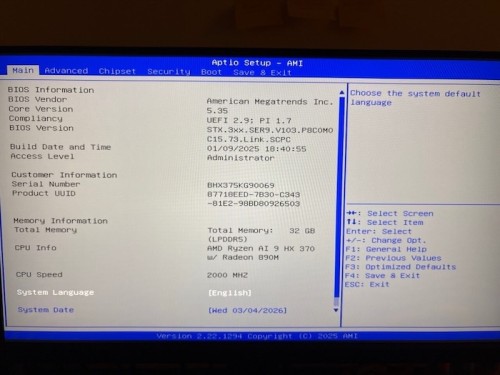
ST. 3XX.SER9. V103. PSCOMO
C15.73. Link. SCPC
Device:
8B.023880834GA0
SN: BHX375KG90069
SER9PRO-L-321TBVK0W64PRO-DP/XA


