Hello,
I want to see what is the latest drivers for my Mini PC SER5 PR.
Issue 1 – Adrenalin Not Detecting Updates
Adrenalin always shows that my system is up to date, even when newer versions are available.
For example, I was on version 25.9.1.0 with automatic updates enabled, but it never updated on its own. The only way I’ve been able to update is by:
Downloading the latest “Auto-Detect and Install Driver Updates” tool
Running a fresh install
I had to repeat this manual process for each upgrade:
25.9.1.0 → 25.10.2.0
25.10.2.0 → 25.12.1
25.12.1 → 26.3.1.0
Issue 2 – Chipset Driver Update
I’m currently on chipset driver version 6.07.22.37.

When I run the AMD installer, it indicates that an update is available, but:
There is no clear option or prompt to proceed with the update
I’m unsure how to complete the installation
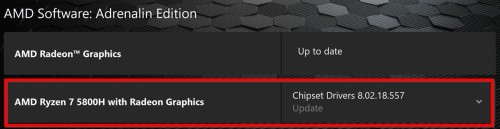
I contacted Intel and they advise me to get in touch with Beelink, this is their resposne
Dear Yahya,
Thank you for contacting AMD.
Regarding Adrenalin not updating automatically, this is expected behavior. Windows Update or OEM drivers may override AMD releases, and Adrenalin only checks and downloads updates—it still requires manual installation.
For OEM systems like the Beelink SER5 PRO, using generic AMD drivers is not always recommended, as it may cause compatibility issues.
Regarding chipset drivers, the installer requires manual selection of components rather than a clear “Update” option. However, for your CPU, AMD does not provide standalone chipset drivers, as it is designed for OEM systems.
We recommend contacting your system manufacturer for the appropriate drivers.
SN: D58003FF40135
SER5 PRO-E-16500EJ0W64PRO-D
x2 HDMI Ports
BIOS Version/Date 5800H502, 2/15/2023
