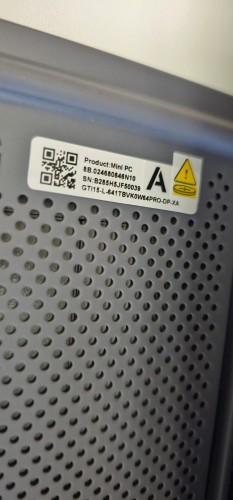
My Beelink GTi15 Ultra (Core Ultra 9 285H) is stuck in a no-POST / boot-loop state. It powers on with a white LED, the fan runs normally, and the rear RJ45 lights come on, but it never shows the Beelink logo or BIOS on screen. After about 1–3 minutes the white power light goes off, then comes back on again, repeating this cycle.
What I already tested
Removed the EX dock and GPU completely.
Performed a CMOS reset and waited more than 10 minutes.
Tested with HDMI and DP directly connected.
Pressed Delete repeatedly during startup to enter BIOS, but no BIOS screen appears.
Removed the SSD completely and tried booting with only power, keyboard, and display.
Tested RAM stick 1 in the first slot
Tested RAM stick 2 in the first slot as well.
What happened during RAM tests
With RAM installed in the first slot, the white power LED stays on more stably for longer, about 2 to 3 minutes, but still no display signal or BIOS appears.
RAM2 in slot 1 behaves exactly the same as RAM1 in slot 1.
The fan runs at normal speed.
Still no video output and no BIOS access.
Current symptom pattern
Power LED turns on.
Fan runs normally.
No BIOS splash, no display, no response to Delete key.
Power LED eventually turns off and then turns on again in a repeating cycle.
Same issue occurs without SSD and without EX dock.
What I suspect
Since the issue remains after removing the SSD, dock, and testing both RAM sticks, this looks like a pre-boot / POST failure, likely related to BIOS/firmware corruption, memory initialization failure, or motherboard-level POST fault rather than a Windows or storage issue.
Help me to resolve this issue serial no details attached