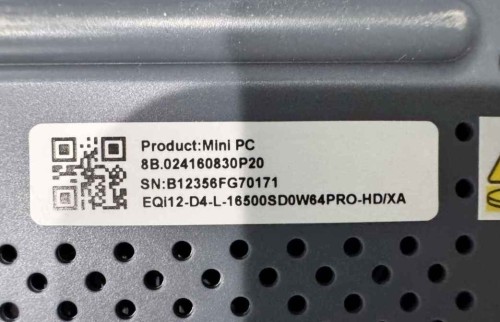
Having trouble installing USB drivers for my EQi12. Windows 10.
serial: B12356FG70171
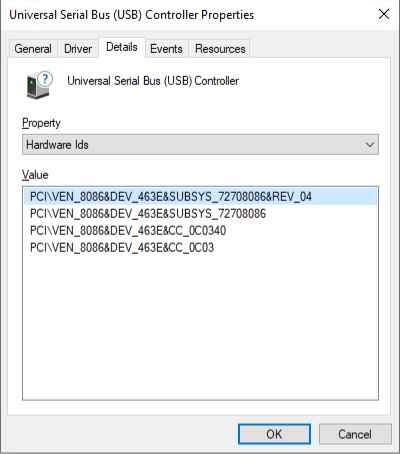
Device manager HW IDs for both of the USB devices.
PCI\VEN_8086&DEV_463E&SUBSYS_72708086&REV_04
PCI\VEN_8086&DEV_463E&SUBSYS_72708086
PCI\VEN_8086&DEV_463E&CC_0C0340
PCI\VEN_8086&DEV_463E&CC_0C03
PCI\VEN_8086&DEV_466D&SUBSYS_72708086&REV_04
PCI\VEN_8086&DEV_466D&SUBSYS_72708086
PCI\VEN_8086&DEV_466D&CC_0C0340
PCI\VEN_8086&DEV_466D&CC_0C03
I found this link where the person was having the same trouble. Used the same drivers that worked for everything except for the USB drivers.
https://bbs.bee-link.com/d/4142-eqi12-chipset-and-serial-io-drivers
https://dr.bee-link.cn/?dir=uploads%2FEQI%2FDriver%2FEQI12 about 2 gb of drivers in 1 zip file.
Installed the chipset and serial IO drivers from the package on the link above, but the USB drivers are still not loading.
Updated to FW EQi12D406, but that did not help.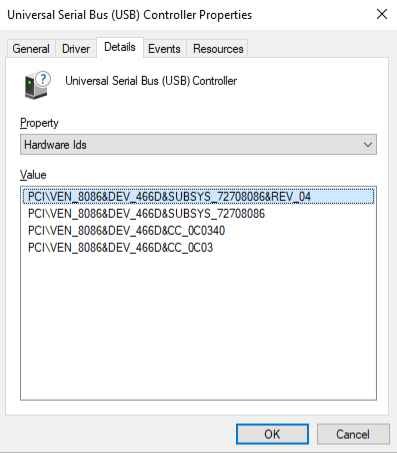
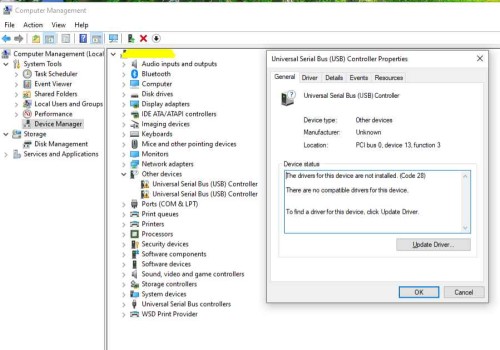
I checked further and it looks like these may be related to Thunderbolt drivers, not sure why the provided drivers from the beelink downloads are not working. Can anyone help find the correct drivers?