Hello!
I need your help recovering my Beelink GT1 Ultimate, and I would be very grateful if you could provide the correct original firmware for my exact hardware revision.
My TV box specifications:
Model: Beelink GT1 Ultimate
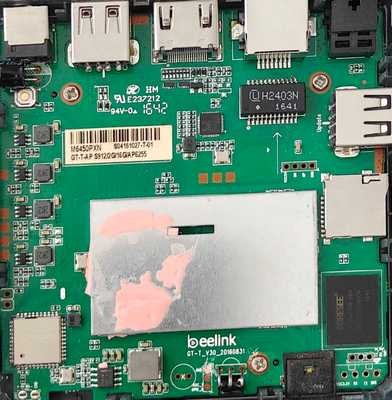
Motherboard revision: GT-T_V30_20160831
Board sticker: GT-T-AP S912 / 2GB RAM / 16GB eMMC / AP6255 Wi-Fi
Processor: Amlogic S912
Unfortunately, the box stopped booting after an unsuccessful firmware flash.
I have tried recovering it using both a microSD card and Amlogic USB Burning Tool, but neither method has worked. USB Burning Tool initially stopped at 2% with error 0×10105002. After trying another original firmware image, it stopped at 3% with the following error:
0×10202003 — Romcode/Lead UBOOT/Download UBOOT/Data transfer error
I have also tried different USB ports, cables, another computer running Windows 7, and flashing with and without the Reset button. The result is always the same.
Could you please provide the following files specifically for my motherboard revision and hardware configuration?
The correct original firmware image (.img) for recovery using Amlogic USB Burning Tool.
The correct firmware package for recovery from a microSD card, including all required files and instructions.
If necessary, the appropriate bootloader or DDR initialization files for my exact RAM configuration.
I would also appreciate any specific recovery instructions for a box that no longer boots and cannot be flashed using the usual methods.
I want to make sure I use firmware compatible with my exact hardware revision, rather than a firmware image intended for a different GT1 Ultimate version.
Thank you very much for your time and assistance. I hope you can help me bring my device back to life.
Best regards
P.S. There is no serial number on the housing.


