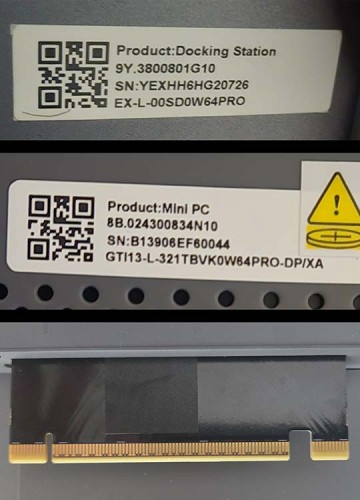
Hi! I’ve been trying to get my GTI13 Ultra working with the EX Dock pro and gpu. It’s been a journey… At the end of a 9 hour marathon session, I was able to get the computer to see the hardware for 2 bootups, long enough to make sure I installed all the most recent NVIDIA drivers for it, but was never able to get the graphics card to be detected after rebooting with the monitor plugged into it. And unfortunately, now I can’t even get windows to see the graphics card at all any longer. At this point I’m ready to call it a faulty ex dock pro, but just to be sure I would love to know exactly what my BIOS settings should be, as all the different sources around the internet are slightly different.
BIOS CONFIG:
- BIOS updated from GTIT104 to GTiT106 (official Q1 2026 release), settings re-applied after flash
- Chipset > System Agent > PCI Express Configuration > PCI Express Slot Selection: CEMx4 slot
- Root Ports 1-3, PCIe Speed forced to Gen3 (This was how I got it to work long enough to install the GPU drivers)
- Primary Display: AUTO (Though previously tried PEG Slot and that didn’t work)
PROBLEM:
The GPU intermittently fails PCIe link training at power-on. On some cold boots the card enumerates correctly — it appeared in Device Manager, NVIDIA drivers installed successfully, and it was fully recognized as an RTX 5060 Ti. On most subsequent boots (including full cold boots from complete shutdown), the card does not appear on the PCIe bus at all: Device Manager shows it grayed out or absent, and the GPU’s display outputs stay black even though Windows loads normally on the iGPU. The GPU’s fans spin and LEDs light, so slot power is present. Warm resets never recover the link.
When PCIe Speed was set to Gen4, the card dropped off the bus entirely, so I have been running Gen3.
TROUBLESHOOTING ALREADY PERFORMED (no improvement):
- BIOS update to GTiT106
- Multiple full cold boots (complete shutdown, not restart)
- Reseated the GPU in the dock’s PCIe slot and verified power cables are fully seated
- Fully separated and carefully reseated the mini PC on the dock’s mating connector; inspected both connectors for debris/bent pins; retention plate secured
- Tested lower PCIe link speeds
Given that the identical configuration works on some boots and fails on others with all power management disabled, this appears to be a hardware-level signal integrity or link training fault in the dock or dock connector rather than a configuration issue.
My serial numbers for the mini and the dock are attached. I purchased the mini and dock specifically to use together, and confirmed this GPU was supported on your forum. Please advise on next steps.