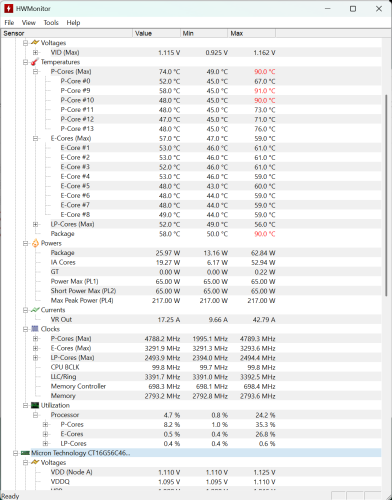
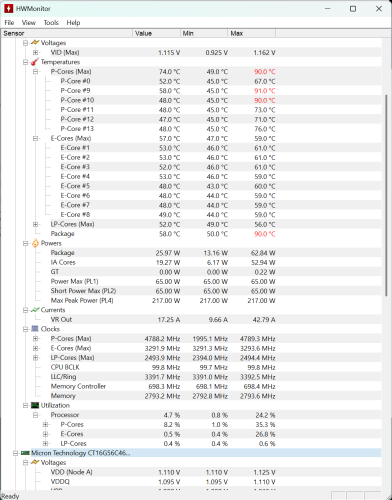
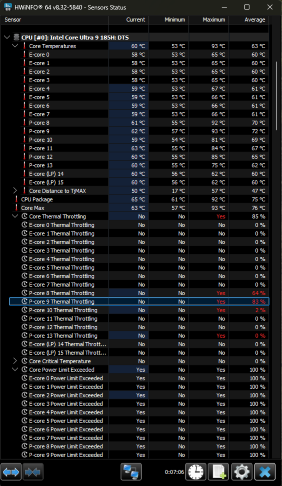
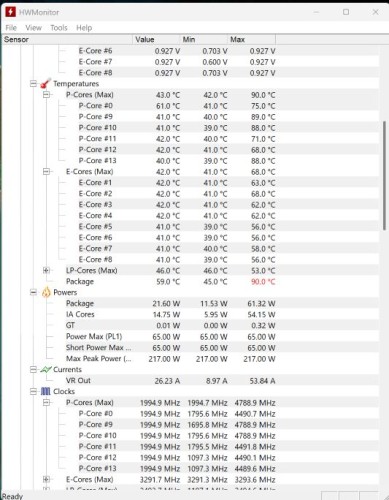
jimcit Hi, I recently boght the bundle gti14 Ultra 9 185 96gb and dock, and I bundled it with an Rtx 5080. The problem is I´m getting (core) very high temperatures, and the pc is in idle. It is connected to the monitor with DisplayPort. Please help.
Beelink CS-George jimcit Hi there, please install the tool https://url.bee-link.cn/In9p or https://mega.nz/file/7zgg2ARA#G9zIg1wT7DMvmIWrOO9tGMgsXFm3vOhARUVekxrz24M
jimcit Beelink CS-George Hi, yes, I had to change power settings to lower the temperature. Now my problem is bluetooth dissapeared, any solution??
Beelink CS-George jimcit Hi there, can you see the Bluetooth adapter in the device manager ? Please send us a screenshot . You can update the BT driver. Here is the driver https://url.bee-link.cn/qwOm Here is another solution: Please turn off the PC , unplug the power supply and other USB devices, then put the pin in the CMOS pinhole and press it for about 10 seconds , restart the PC after ten minutes. Here is the tutorial https://url.bee-link.cn/5FdW
jimcit Beelink CS-George Thanx, only worked last solution, unplugging and pin in the CMOS pinhole. One question, does it change anything else in the bios? Thanx.
BLindsey I am having the same problem. I have been working with “bakahk” on the forum since early October. I supplied everything he asked. Still hot at idle. He quit replying October 30th. no response to my last entry. The following is a link to my support thread. https://bbs.bee-link.com/d/8236-gti14-cpu-very-high-temperatures-at-idle These are the screenshots and files I sent him. hwmonitor-idle-no-dock-horz.zip8kB hwmonitor-idle.zip9kB Please reply Thanks
Beelink CS-George Hi there, please use this tool https://url.bee-link.cn/In9p or https://mega.nz/file/7zgg2ARA#G9zIg1wT7DMvmIWrOO9tGMgsXFm3vOhARUVekxrz24M
BLindsey I downloaded the tool and ran it. not sure what to do next. What is the tool and what steps do I need to do to use it?
BLindsey I have installed the tool and ran it. I have no idea what it did. I will include a screenshot
Beelink CS-George BLindsey Hi there, did you run ASM2307MPTool.exe? After you run it, please unplug the power supply , then plug it back , turn on the PC to see if the power will drop