Beelink CS-George Sergi Hi there, Did you enable secure boot in the BIOS ? Please repeatedly press delete key as soon as you turn on the PC, go to BIOS. On Save&Exit page, please click Restore defaults, press enter to confirm, then press F4 to save.
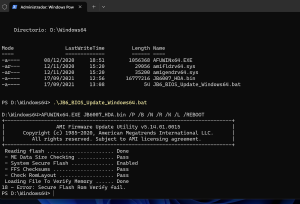
Sergi Hi George, I do it but I have the same error before. 18 - Error : Secure Flash Rom Verify fail Thanks for help me
Beelink CS-George Hi there, please take out the CMOS battery and then put it back after a few minutes.
Sergi Hi George, I dissable the CMOS battery for some minutes but then I have the same error that before: 18 - Error: Secure flash rom verify fail I don’t know what happens. Thanks for your time
Beelink CS-George Sergi Hi there, but this is the only BIOS file we have if you want to disable the auto power on. Did you try another USB flash drive ? What is the format ?
Beelink CS-George Sergi The reason for the unsuccessful flash may be that the BIOS cannot be rolled back. We recommend performing a power-on boot.
Sergi Hi George, So, does that mean I can’t go back to the other BIOS to disable boot on startup? There is no way to disable start-up when power on? Thanks
Beelink CS-George Sergi Thank you for your reply. Yes. That’s the current situation. It might be feasible to manually flash the BIOS by sending the machine back to China.