Thank you for your rapid reply.
Here are answers to your questions:
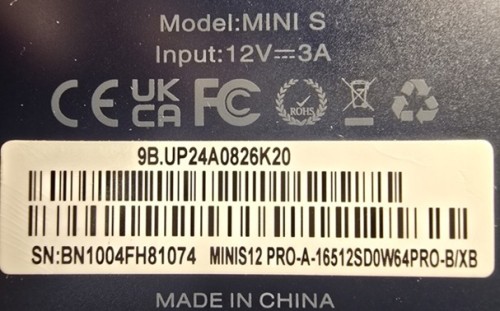
1) Picture of Serial Number- Attached.
2) Is the machine unable to power up at all? - Yesterday there was no success in booting when the initial failure occurred. Power light would come on and immediately would go off.
Today, connecting power and monitor to it, it booted directly into BIOS. However the video kept blinking off (not rebooting, remaining in BIOS but with the video dropping out and back on).
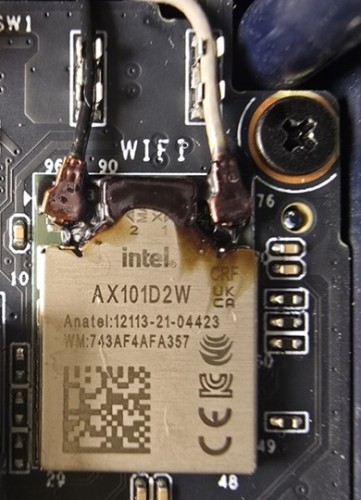
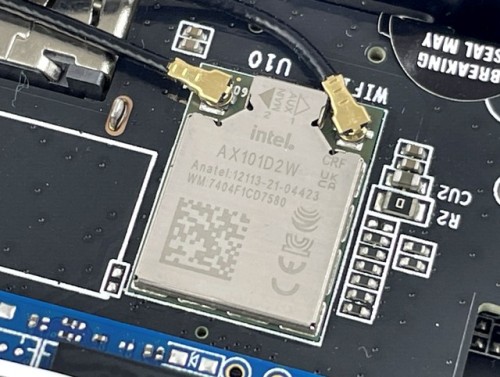
3) Wiping with 75% alcohol - I did this suggestion, using alcohol and cotton swab (Q-Tip). However the wire remains darkened as does the wi-fi chip itself. When I compare a copy of the picture of my chip to one that is functional, you can see that part of the chip between the two antenna connectors is entirely burnt / damaged (I will provide pictures).
4) Resetting the CMOS - following the pin-in-hole method, I disconnected all external items, held CMOS CLR for 15 secs (power to ground), and waited patiently for over 10 minutes. I was able to get the device to boot. It appears to be working.
HOWEVER… there is no question that the wi-fi chip is damaged. Physically damaged from whatever may have happened. Wi-Fi still does function, but the fact that the chip apparently took some sort of damage is very concerning.
If there is a chance to return this and replace it even with a refurbished bare-bones box, I would greatly appreciate your consideration to do so, as the system is not at all as it was designed to function, and this damage is not the result of user error. (Likely your Intel representative would like to see this as well.)
As mentioned in point #1 I have included the serial number for your review.
Thank you,
Vincent