Antonio plm
Do you have speaker to plug in ?
It `s about audio driver ,we will send you the driver package to try .
Please send us a picture of SN on the bottom to confirm.
Thanks for your patience and your understanding.
Or reinstall the system
Beelink
Please go to MS official for the latest system .
Windows11 tutorial: https://url.bee-link.cn/74zu,
Windows10 tutorial:https://url.bee-link.cn/dbOB
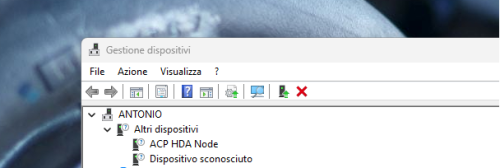
- Uninstall or disable the device below ANTONIO , then restart it .
5.CLR CMOS
First, please unplug the power supply and HDMI cable.
Secondly, Please hit the “CLR CMOS” button/hole for about 10 seconds.
For some models the CMOS hole could be in the Audio port .
Please wait until 10 minutes later (THIS IS VERY IMPORTANT),
Then plug the power supply and HDMI cable back in, turn on the PC again,
once turn on the PC, you will need more than one minute to wait for the PC to enter the system.
See if it works. Please try few more times.
6.(Please back up your important data)
Reset System Steps:
Restart the device. When the circling appears, press the power button for 5 secs until the device shuts down.
Repeat this process two or three times.
When you see the repair page, choose Advanced options, Troubleshoot, Reset, and select Keep my files.