Hello there, and thanks for the Win Installation Manual - appreciate this help very much!
Question 1:
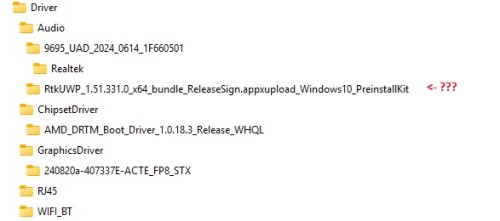
I was downloading the Beelink Drivers for my SER9 HX370 - SN starting with “B” but unfortuantely don’t know which of the folders/files in the Zip-Archive are associated with the corresponding Hardware devices in the Windows 11 Device Manager, as there is no Manual.
Uploads\SER\SER9–AI-9-HX-370-365\Driver\SN-starts-with-B\SER9-Driver_2024-09-25_6-09-20.zip
(I took this Driver package and hope it is the correct)
Especially the ZIP-File “RtkUWP_1.51.331.0_x64_bundle_ReleaseSign.appxupload_Windows10_PreinstallKit” there is no Install-, Bat- or EXE-file and I don’t know for which device in the Windows Device Manager this Driver is associated?
Also the other Audio, Chipset, RJ45, WIFI & BT Drivers all have install-programs, so I guess I should run all of them first, instead of trying to manual update drivers in the Windows Device Manager, as described in your send Manual? correct
Question 2:
Another question I have, as I wanted to make sure I have the latest BIOS installed, but somehow with my SER9 HX370 - SN starting with “B” and the installed AMI Bios Version “SER9T103”, I didn’t find the correct Bios Version Folder on the Beelink Repository.
Uploads\SER\SER9–AI-9-HX-370-365\BIOS\????
There are only Bios for SN starting “Y or B” but not any with Version “T103”. There are all for Version “V103” nd for Version “T103” there are only with SN starting with “D”.
Also my AMI Bios is from 10/28/2024 so more than 1.5 year old, but I bought my Beelink brand new just 2 weeks ago deliverd directly by Beelink. So did I get a old device or do I have a wrong BIOS istalled with SN starting “B” and Bios Version “T103”?